Post scheduling
The publishing queue and calendar distribute prepared posts across connected social accounts, giving you an overview of available slots and planned activities by channel.
Buffer: Publish and Insights cleverkitools.comcurated by Clever Mangos
 Editorial selection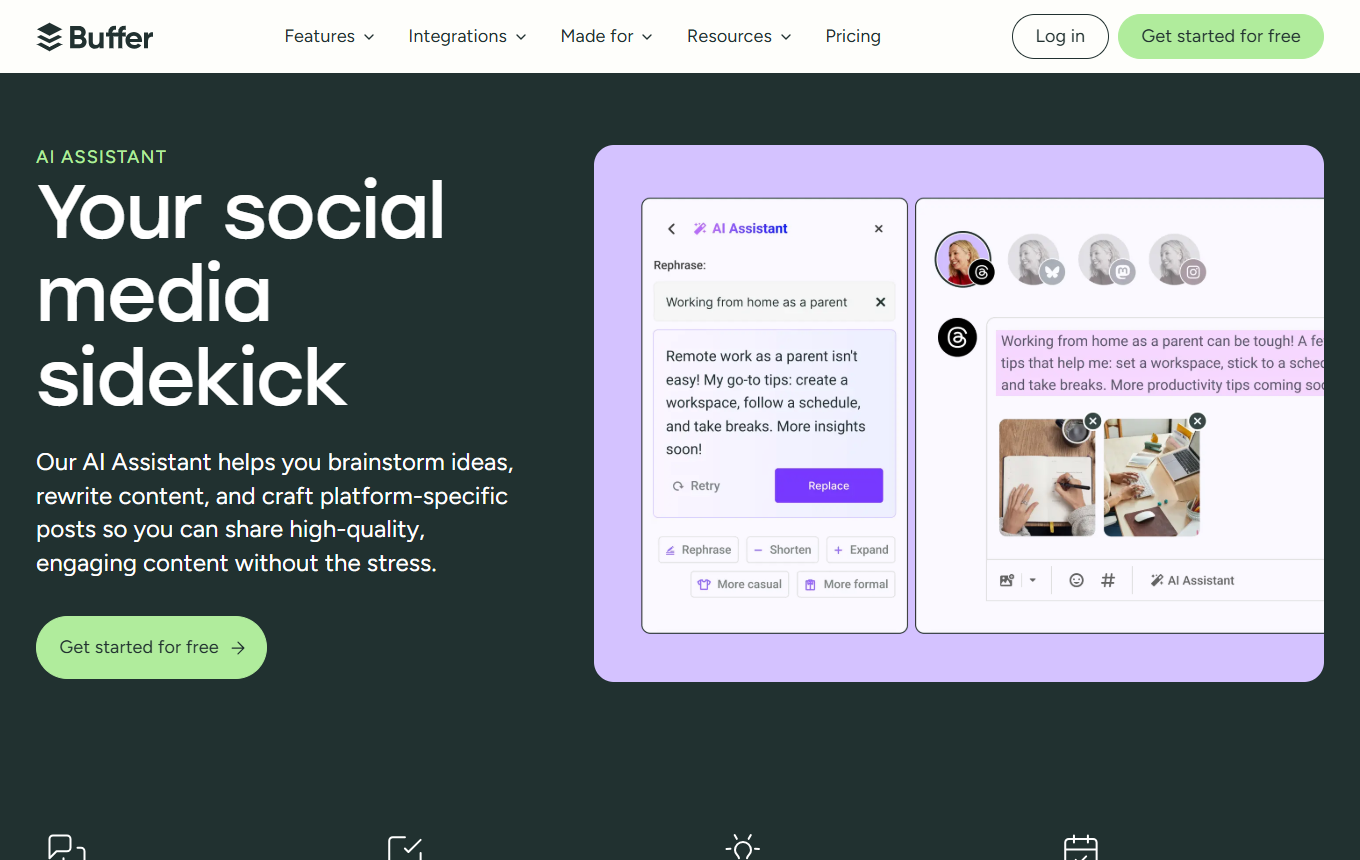
Buffer: Streamlined social scheduling with an AI assistant for small teams and creators. In practice, its value centers on post scheduling, AI captions and a channel overview.
Editorial review: Jul 4, 2026
Facts checked: Oct 18, 2026
Translated: Oct 18, 2026
Practical value, usability and value for money, equally weighted.
Buffer is particularly suited to a workflow centered on post scheduling: collect source material, refine it with AI captions and turn the result into usable assets with an overview of your channels.
Buffer stands out for its specific combination of post scheduling, AI captions and a channel overview; this distinguishes it within the 'Social Media & Ads' category from purely general-purpose or specialist solutions.
If you need complex approval processes, social listening, or deep enterprise analytics, Buffer is too lightweight.
The publishing queue and calendar distribute prepared posts across connected social accounts, giving you an overview of available slots and planned activities by channel.
Buffer: Publish and InsightsThe AI Assistant generates and revises supporting copy directly in the composer, for example turning a rough idea into a shorter caption with the right tone.
Buffer: AI AssistantThe combined report brings together top posts and publications from several channels so you can compare topics and activity over a selected period.
Buffer: Publish and InsightsTypical outputs with Buffer: post scheduling, AI captions, channel overview; for small businesses, also a short briefing, a checklist, and a next action for the responsible team.
Facts checked: Oct 18, 2026
DPA linked on the legal page, transfers protected through the Data Privacy Framework. DPA: yes · EU hosting: no · Headquarters: USA · Source
Facts checked: Sep 30, 2026
Free plan: yes
Free plan, from 6 USD/month per channel (Essentials). Annual price: 60 USD per channel (5 USD per month), with a 14-day trial. The AI assistant and API access are also included in the free plan with up to 3 channels. Source
Free plan
Facts checked: Sep 30, 2026
Plan two weeks of social content from a single blog article: create hook variants, channel copy, a publishing schedule and initial caption drafts.
Split this asset into five channel variations and assess each by hook, audience and expected contribution to post scheduling.
Paste an approved section of your newsletter into the AI Assistant and ask it to shorten it to one key point with a concrete example. Move the draft into the Composer and add the appropriate link yourself. Check that the post makes sense without the newsletter context.
Buffer: AI AssistantIf a draft seems too long, use Shorten and compare it with the original sentence by sentence. Pay particular attention to restrictions, price components and dates that may be lost when shortening it. Then choose an appropriate factual or casual tone before scheduling the post.
Buffer: AI AssistantSources: Oct 18, 2026
In an independent hands-on review, Rob Clymo highlights Buffer's simple, clearly structured user interface.
Rob ClymoTechRadar · Feb 28, 2026
I work with more focus and need at most one hour a week to write and schedule my posts for the coming week.
Vicki LovegroveBuffer is particularly suited to a workflow centered on post scheduling: collect source material, refine it with AI captions and turn the result into usable assets with an overview of your channels.
If you need complex approval processes, social listening, or deep enterprise analytics, Buffer is too lightweight.
Post scheduling; AI captions; channel overview
Plan two weeks of social content from a single blog article: create hook variants, channel copy, a publishing schedule and initial caption drafts.
Free plan · from 6 USD/month per channel (Essentials). Pricing details and the documented check date are in the pricing section of this page.